What Does SQL Server Change Tracking Actually Cost?

Let’s say we’re keeping a local copy of a product catalog. SQL Server has ten million products, and a thousand have changed since our last sync. Fetching the whole catalog again would copy a lot of data we already have.
A price edit should replace the old price in our copy, and a deleted product should disappear. If a worker crashes halfway through processing this edit, it needs to pick up where it left off without quietly skipping anything.
SQL Server’s Change Tracking (CT) can tell us which rows have changed by giving us their keys. I’ve implemented it for a project at work, and for this post I wanted to showcase the numbers around the work involved: recording changes, fetching them, updating the local copy, and cleaning up the metadata afterward.
The size of a table, the amount of change happening on it, and the amount of data a consumer fetches are separate questions. A ten-million-row table with a thousand changes is a completely different job from the same table with a million.
What SQL Server remembers
When a transaction changes a tracked row, SQL Server records the change information in that transaction. Later, our worker can ask for the affected keys and join them back to the source table to get the current values. For our scenario, that’s enough to bring our copy of the catalog up to date. Other cases may require the actual delta or every intermediate change. Change Tracking can’t provide that history, and would require, say, an event/audit log or historical capture, such as Change Data Capture (CDC).
We’ll start with a small dbo.Product table and four columns: ProductId, Name, Price, and Description. We’ll use ProductId as its primary key and put it in a database called Catalog.
USE master;
GO

CREATE DATABASE Catalog;
GO

USE Catalog;
GO

CREATE TABLE dbo.Product (
    ProductId int PRIMARY KEY,
    Name nvarchar(200) NOT NULL,
    Price decimal(18, 2) NOT NULL,
    Description nvarchar(max) NULL
);ALTER DATABASE Catalog
SET CHANGE_TRACKING = ON
(CHANGE_RETENTION = 2 DAYS, AUTO_CLEANUP = ON);
ALTER TABLE dbo.Product
ENABLE CHANGE_TRACKING
WITH (TRACK_COLUMNS_UPDATED = ON);SQL Server requires the primary key to identify changed rows. I’ve also turned on column tracking, which is optional and off by default, so we can look at what it records. Normally, you’ll want the change retention duration to cover the longest gap between successful syncs, along with the time the worker needs to catch up, but I’ve left it at two days for now. Depending on your development cycle, you may also want room to debug and push a bug fix.
We need a starting point, so we’ll save the current tracking version before inserting a product. Then we’ll change its price a couple of times, with a description edit in between:
DECLARE @last_version bigint = CHANGE_TRACKING_CURRENT_VERSION();

INSERT dbo.Product (ProductId, Name, Price, Description)
VALUES (42, N'Desk lamp', 19.99, N'Original description');

UPDATE dbo.Product SET Price = 20.99 WHERE ProductId = 42;
UPDATE dbo.Product
SET Description = N'Warm white light'
WHERE ProductId = 42;
UPDATE dbo.Product SET Price = 22.99 WHERE ProductId = 42;

SELECT ProductId, SYS_CHANGE_VERSION,
       SYS_CHANGE_OPERATION, SYS_CHANGE_COLUMNS
FROM CHANGETABLE(CHANGES dbo.Product, @last_version) AS ct;
I ran this against an empty, newly tracked table on SQL Server 2022 and 2025, with each write committing separately. Both returned the same row:
ProductId  SYS_CHANGE_VERSION  SYS_CHANGE_OPERATION  SYS_CHANGE_COLUMNS
42         4                   I                     NULL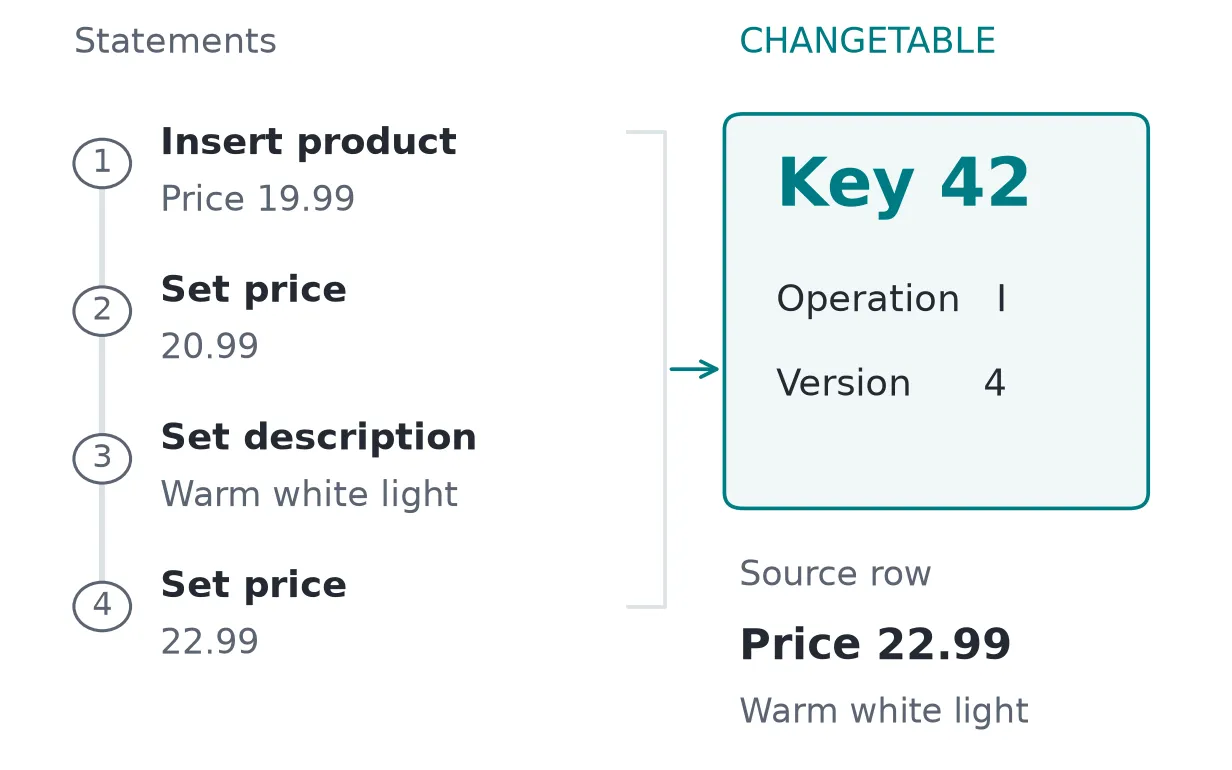
The operation above is I (insert) because we saved our starting point before the insert. As far as our copy is concerned, this is a new product. Joining back to the source gives us 22.99 and the final description; the earlier prices aren’t in the tracking result.
If we save the version after the insert and then update the product, we get U (update) instead. CHANGETABLE(CHANGES …) returns one row per changed key, relative to the version we supply, so the same product can be an insert to one worker and an update to another with a later checkpoint.
CHANGE_TRACKING_CURRENT_VERSION() gives us the database’s version associated with the last committed transaction. We’ll save it as a checkpoint after a successful sync and use it as the starting point for the next one. It’s a database-level token, rather than a timestamp or row ID. One transaction can change a thousand products that all share the same version.
Getting a consistent batch
The examples above finish writing before asking for changes. A real application won’t be that cooperative: prices can change while the worker is in the middle of a sync.
If we copy the catalog first and then ask for the current version, a price update could commit between those tasks. We could save a checkpoint that includes the update, even though our copy still has the old price. On the next poll, when we ask for changes after that checkpoint, we would have just skipped a price change without getting an error.
Syncing several tables gives a writer more opportunities to commit between our reads. We could copy one table from before its transaction and another from after it, even though the writer changed both together. Cleanup can also remove tracking information between the worker checking a checkpoint and using it.
We can keep these reads consistent by putting them inside an explicit snapshot transaction. We’ll need to allow snapshot isolation on the database first:
ALTER DATABASE Catalog SET ALLOW_SNAPSHOT_ISOLATION ON;Inside the transaction, we check the saved version against every table we’re syncing and capture the next version. Then we can read the changes and their source values and commit.
For the check, we use CHANGE_TRACKING_MIN_VALID_VERSION(). It gives us the oldest usable checkpoint for a particular table. If ours is older than that, some of the changes we need may already be gone, and we’d have to rebuild the local copy. Watch out for one trap: @last_version < NULL is never true, so that comparison won’t take the error branch. We have to reject an unexpected NULL explicitly, which can happen with an invalid object ID or insufficient permissions.
@last_version comes from our saved checkpoint. That assumes the database hasn’t been restored and tracking hasn’t been reset since that checkpoint. We’ll deal with those cases later on:
SET XACT_ABORT ON;
SET TRANSACTION ISOLATION LEVEL SNAPSHOT;

-- The checkpoint saved after the last successful sync.
DECLARE @last_version bigint = 0;

BEGIN TRY
    BEGIN TRANSACTION;

    DECLARE @minimum bigint = CHANGE_TRACKING_MIN_VALID_VERSION(
        OBJECT_ID(N'dbo.Product'));

    IF @last_version IS NULL OR @minimum IS NULL
       OR @last_version < @minimum
        THROW 50001, 'The checkpoint cannot be used.', 1;

    DECLARE @next_version bigint = CHANGE_TRACKING_CURRENT_VERSION();

    IF @next_version IS NULL OR @last_version > @next_version
        THROW 50002, 'The database boundary cannot be used.', 1;

    SELECT ct.ProductId, ct.SYS_CHANGE_OPERATION,
           p.Name, p.Price, p.Description
    INTO #ProductChanges
    FROM CHANGETABLE(CHANGES dbo.Product, @last_version) AS ct
    LEFT JOIN dbo.Product AS p ON p.ProductId = ct.ProductId;

    COMMIT;

    SELECT @next_version AS NextVersion;
    SELECT * FROM #ProductChanges ORDER BY ProductId;
END TRY
BEGIN CATCH
    IF XACT_STATE() <> 0 ROLLBACK;
    THROW;
END CATCH;We’ve copied the results into #ProductChanges, so ending the snapshot doesn’t change the batch we’re about to apply. That temporary table still belongs to this connection, though. If we lose the connection, we lose the batch, so we can’t save the new checkpoint yet. A dedicated connection also keeps the worker’s snapshot isolation setting from carrying over into unrelated queries.
If you already have read-committed snapshot isolation (RCSI) enabled, you’ll still need the explicit snapshot transaction here. Compare these two reads, with a writer committing a new price in between:
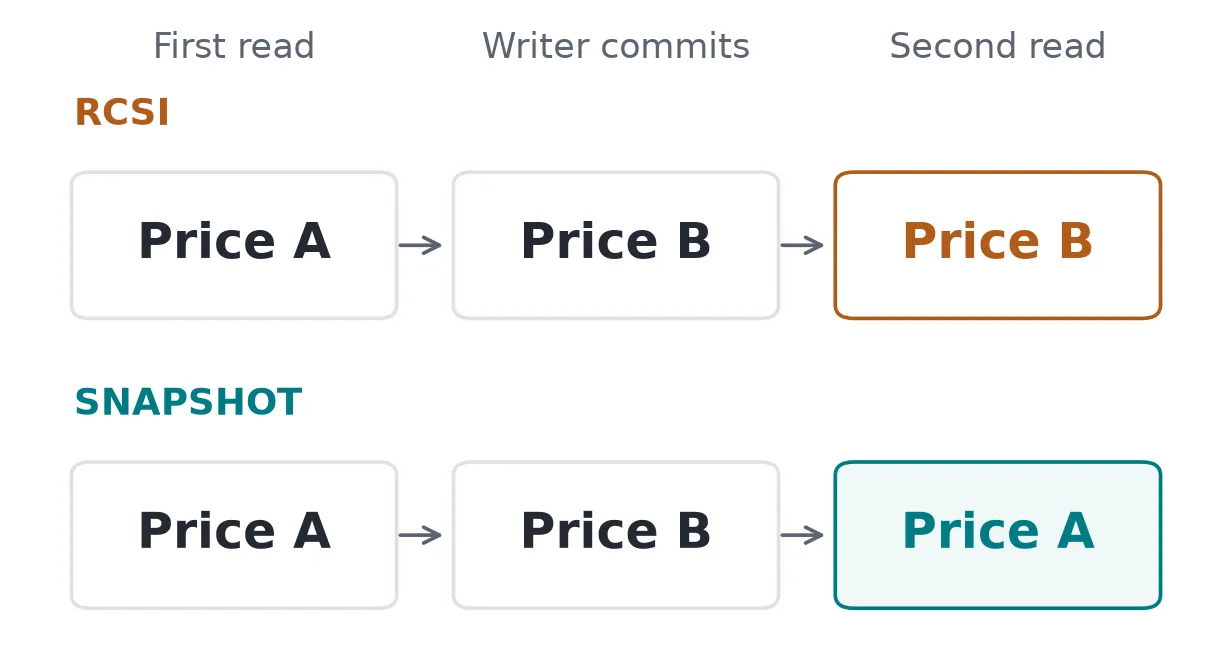
Both checks used a single reader transaction. Under RCSI, the second statement saw the newly committed price. Under snapshot isolation, it kept seeing the earlier price. Our sync spans several statements, so we need the transaction-wide view to keep the data and checkpoint together.
The first sync needs the same treatment. Read the full catalog and its version inside one snapshot, then save the data and checkpoint together at the destination.
Saving the checkpoint last
Once we’ve fetched the batch, the worker needs to retry it. For this catalog, we can insert or replace product values and let a repeated delete do nothing. The new checkpoint gets saved only after the whole batch has been applied, or after we’ve durably staged everything needed to finish it after a crash.
For larger batches, we’ll probably want pages. The change version is a useful cursor until one transaction changes more products than fit on a page. Say I inserted 1,001 products in one transaction, read the first 500 keys, and saved their maximum version. Using that version for the next change query would return zero rows. The remaining 501 products have the same version as the ones we’d already read.
Saving the complete batch first lets us page through those fixed rows by key. We can then record how far we’ve gotten through the batch without advancing its final checkpoint. This also permits us to process the batches in order, so retrying an old batch can’t overwrite values from a newer one.
Where the work goes
SQL Server keeps an internal change table for each tracked table and a shared transaction table for the database. A change record includes some fixed overhead, the primary key, and optional context and column information. With that storage layout, changing the key or the number of commits changes what SQL Server has to store. So both of those are yours to choose.
Every write has another structure to maintain, much like an index, though how much it adds still depends on the update.
The snapshots keep row versions around as well. With accelerated database recovery (ADR) disabled, those versions live in tempdb. With ADR enabled, they live in the user database’s persistent version store, alongside other database allocations.
For a 100,000-row update with a snapshot open, the version-store dynamic management view (DMV) reported 15,744 KiB in tempdb with ADR off. With ADR on, the persistent version store grew from 136 to 13,256 KiB. The change table itself used 4,512 KiB in both cases.
Benchmark setup
I ran the write and read tests on SQL Server 2022 16.0.4265.3, Cumulative Update 26 (CU26), Developer Edition. The checks covered that build and SQL Server 2025 17.0.4085.5, the General Distribution Release for Cumulative Update 8 (CU8-GDR), Enterprise Developer Edition.
This was on my workstation: a Ryzen 9 9950X3D2, about 60 GiB of OS-visible RAM, and a WD_BLACK SN8100 NVMe drive. Each SQL Server container had a four-CPU quota and an 8 GiB memory limit, with max server memory set to 4,096 MB and maximum degree of parallelism (MAXDOP) set to 1.
The databases used compatibility level 160, SIMPLE recovery, ordinary disk-based tables, an integer clustered primary key, and no compression. Snapshot isolation was on; RCSI, ADR, and Query Store were off. I left retention at two days and disabled automatic cleanup during the write tests so it wouldn’t run alongside the timed updates. The cleanup tests used their own instances.
The runs cover 4 table sizes, 3 column counts, and 3 tracking modes, so 36 configurations in all. These are warm-workload timings: each configuration ran both update patterns once to warm up, then five times for the measurements. The scripts rotated the tracking-mode order, reset values and tracking state, preallocated files, and read the target pages before timing. Each timed batch includes the SQL loop and successful commits, with 100 rows per transaction.
Enabling tracking on a ten-million-row table with 256 non-key columns took a median of 8 ms without column information and 12 ms with it. That’s the time for the DDL statement to complete once it has its schema-modification lock; copying those ten million products into the application is still a full initial sync.
What the writes cost
Wall-clock timings vary a lot on this workstation, so this comparison keeps everything else fixed: the same one-million-row table and the same 10,000 price updates every time, using key ranges and committing 100 rows at a time.
This pass also included an indexed rowversion column. Without that index, the worker would have to scan the table to find newer versions, which isn’t much of an alternative once the catalog grows.
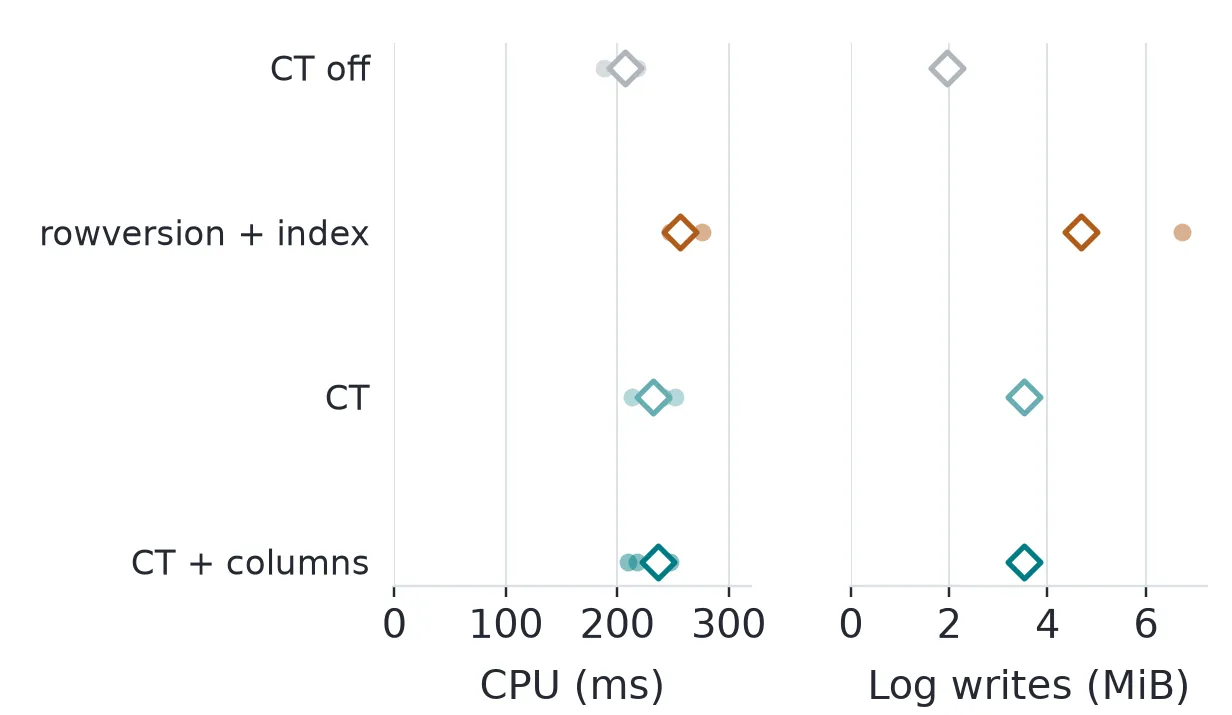
Against the untracked table, Change Tracking’s median CPU was 25 ms higher, with another 1.56 MiB of log writes. Recording column information moved those differences to 30 ms and 1.57 MiB. The indexed rowversion case came out 49 ms and 2.73 MiB higher.
rowversion still doesn’t replace Change Tracking for the worker we started with. It changes on an insert or update, but deleting a product takes its version with it. We’d need soft deletes or a tombstone table to find those removals. A concurrent reader also needs a safe upper boundary such as MIN_ACTIVE_ROWVERSION(), rather than casually saving @@DBTS while another transaction is still open.
Does a bigger table make tracking more expensive?
I started with eight non-key columns and changed exactly 1,000 prices, spreading the keys across the table. Then I grew the catalog from 10,000 to ten million products while keeping those 1,000 updates:
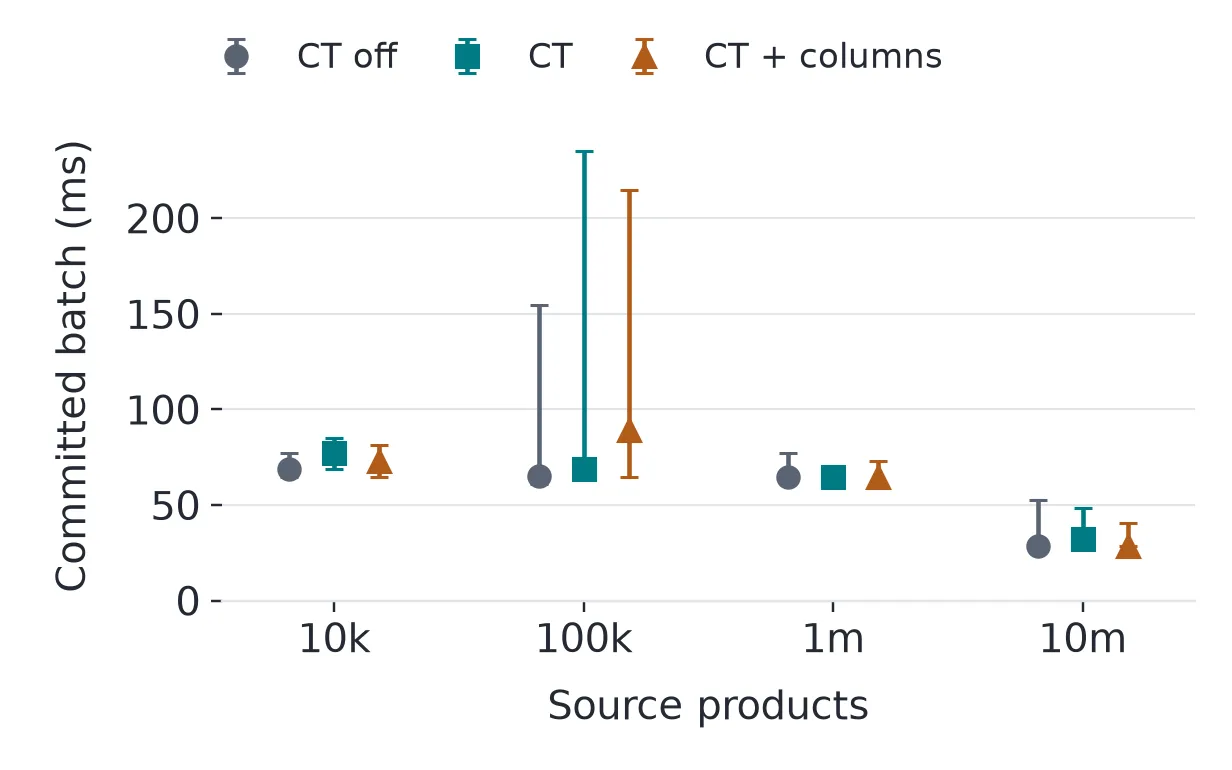
The times don’t increase at a steady rate with catalog size. With tracking on and column information off, the median was 77.0 ms at 10,000 products and 32.4 ms at ten million. The spread between runs, especially at 100,000 products, is too wide for me to take the lower median as a speedup. This was a shared workstation, so I can’t separate it from run-to-run noise :shrug:
Next I changed 1% of each table. The smallest catalog gets 100 updates, and the largest gets 100,000. This is a more realistic relationship between table size and change volume: a 10k-row table probably isn’t getting 100k updates. Or, I’d hope not at least.
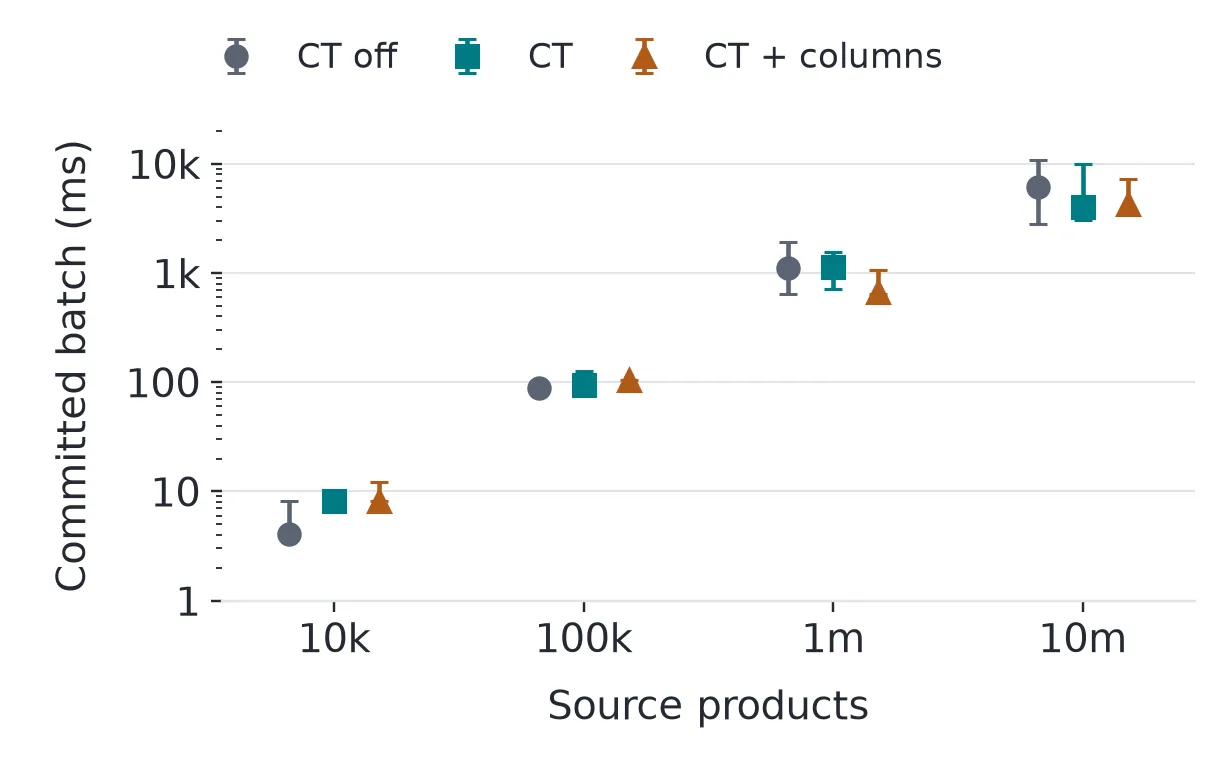
At ten million products, the untracked median was 6.1 seconds, with runs from 2.8 to 10.9 seconds. Tracking without column information came in at 4.0 seconds, with runs from 3.0 to 9.9 seconds. We’ve increased the work from 100 updates to 100,000, and the timings have gone from milliseconds to seconds. Change volume moved them, not the row count. The ordering of the tracking modes is still noisy.
Keep in mind that catalog size hasn’t stopped mattering here. A bigger table usually brings more changes with it, which is why the 1% test is the more honest shape of the question, and row count still drives what the source table itself costs to store.
For equal amounts of work, the latency-overhead calculation is . Applying it to those medians gives a negative number. I’m leaving the wall-clock chart as the noisy result instead of using it for the write-cost percentage.
What if we keep editing the same products? With column tracking off, I made 10,000 row modifications in 100 transactions:
| Updated products | Side-table rows | Returned keys | Used space |
|---|---|---|---|
| 10,000 distinct | 10,000 | 10,000 | 464 KiB |
| The same 100 | 10,000 | 100 | 464 KiB |
Editing the same 100 products gave the worker far fewer to fetch, but the side table still held an estimated 10,000 rows before cleanup. CHANGETABLE is where those writes collapsed into 100 returned keys.
Which columns are we counting?
So far, we’ve been changing prices. A 256-column product table still lets us update just Price and fetch just ProductId and Price. The columns in the schema, in the UPDATE, and in the response don’t have to match.
Adding columns
First I grew the schema the standard way: I kept Name, Price, and Description, then added integer attributes. At one million products, the tables with 8, 64, and 256 non-key columns used about 151, 390, and 1,307 MiB respectively.
Then I tried dividing 2,048 declared non-key bytes among 8, 64, or 256 columns, this time at 100,000 products. That’s a tenth of the row count above, so these only compare against each other: all three used 261.4 MiB. Splitting the same declared width across more columns didn’t change the size.
Updating columns
With column tracking enabled on the 256-column table, I updated 1,000 products three ways: price only, 32 columns, or all 256. Here’s the space used and reserved in the internal change table:
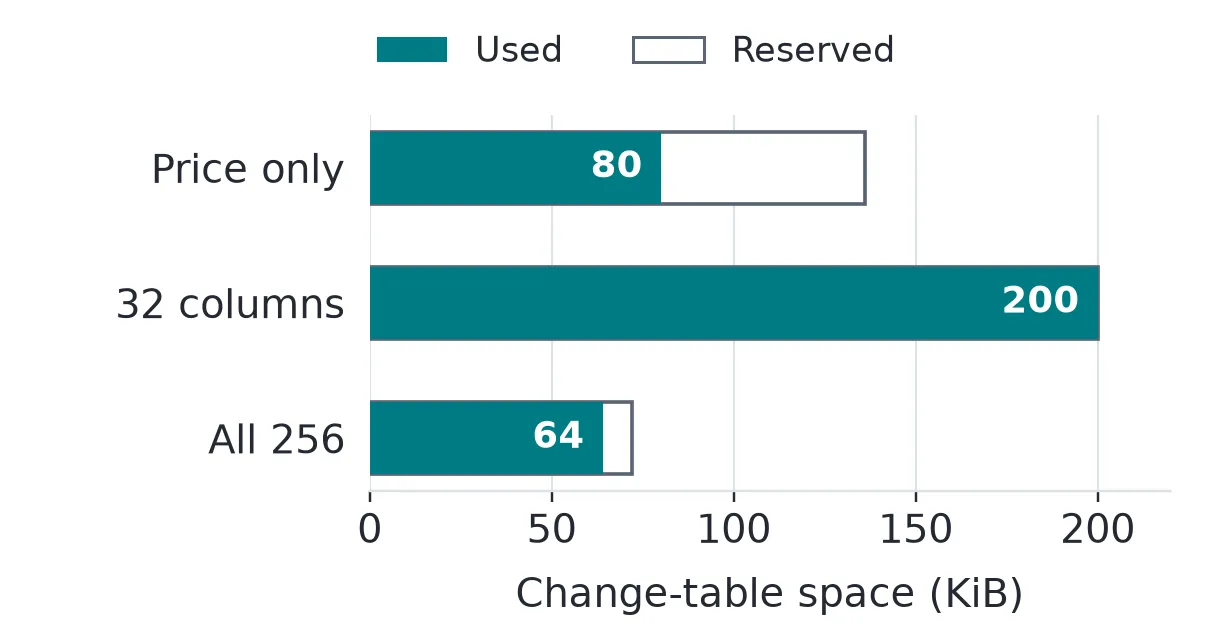
The all-column update used less tracking space than the 32-column update. Look at the column mask returned by each: 8 bytes for price only, 132 bytes for 32 columns, and NULL for all 256. This is because SQL Server uses a special representation when every non-key column is updated.
Microsoft documents four extra bytes per changed column for storing that column information. That’s only one part of storage, so multiplying it by the number of columns won’t give us the total allocated pages. Similarly, SYS_CHANGE_COLUMNS being declared as varbinary(4100) doesn’t mean every change allocates 4,100 bytes.
The statement counts columns even when their values don’t change. This marked Price as updated:
UPDATE dbo.Product SET Price = Price WHERE ProductId = 42;Change Tracking recorded that as an update even though the value stayed the same. If you use an ORM, check the SQL it generates for a price edit. The application may have changed one property while its UPDATE statement names every updatable mapped column, and column tracking follows the statement.
| ORM | Wide UPDATE path |
|---|---|
| Hibernate (Java/Kotlin) | A normal entity update includes every non-ID column by default. |
| NHibernate (.NET) | dynamic-update defaults to false, so its static statement contains every updatable mapped column. |
| EF Core (.NET) | Passing a disconnected entity to DbContext.Update marks all of its properties for updating. |
| Django ORM (Python) | Model.save() with the default update_fields=None updates every loaded field. |
| GORM (Go) | The traditional Save API updates all fields, including zero-value fields. |
| Dapper.Contrib (.NET) | Its Update<T> implementation builds SET from every writable, non-key, non-computed property. |
Change Tracking only sees the SQL that reaches SQL Server, so that’s the bit I care about here.
Fetching columns
Column information becomes useful when a product has large values we don’t want to fetch on every sync. If only the price changed, we can keep the description we already have.
For the reader tests, I gave each of 100,000 products a 16 KiB description and changed only prices. One query used CHANGE_TRACKING_IS_COLUMN_IN_MASK() with the description’s column ID to skip unchanged descriptions. It also returned a DescriptionChanged flag so the destination could tell “keep this description” from “set this description to null.”
Inserts still need their values, and deletes need to remove the local row. An update with a null mask also needs the values our copy uses, since we can’t pick out unchanged columns. SYS_CHANGE_COLUMNS can be null when column tracking is off, when all non-key columns were updated, or for an insert or delete. The mask function handles the format for us; we just need to pass the column ID.
Fetching the changed products
I kept that catalog, changed 1,000 prices, and compared fetching keys alone, a few columns, the whole row, and the response that checks the description mask:
| Response | Fetch and serialize | UTF-8 JSONL size | Product reads | Product LOB reads |
|---|---|---|---|---|
| Keys and change metadata | 2.3 ms | 68.3 KiB | 0 | 0 |
| Keys, name, and price | 2.8 ms | 103.3 KiB | 3,000 | 0 |
| Full rows | 37 ms | 15.8 MiB | 3,000 | 7,006 |
| Description-aware response | 2.9 ms | 144.3 KiB | 3,000 | 0 |
These are medians of three reads after a warm-up, using Node.js 24.19 and Tedious 19 over loopback. The size column counts bytes in the client’s uncompressed JSONL output. I wasn’t able to measure the Tabular Data Stream (TDS) traffic on the wire. “Product reads” and “Product LOB reads” count logical reads against the source table and its large-object storage.
Fetching full rows takes the response from about 103 KiB to 15.8 MiB, even though the descriptions haven’t changed. Checking the mask gets us back to about 144 KiB. That’s a little larger than the narrow response because of the flag and omitted-value marker. It also takes more tracking reads: STATISTICS IO reported 22 across the change and transaction tables, compared with 12 for the first three queries.
The client did some work too. The full-row query used a median of 6 ms of SQL execution CPU according to STATISTICS TIME, compared with about 1 ms for the narrow query. Serializing the full rows into JSON took a median of 11 ms. That’s already inside the client-request duration above, so adding it again would double-count it, and the SQL and client work overlap anyway.
After fetching the rows, applying the 1,000 full rows to SQLite took a median of 6 ms across five transactions, with WAL and synchronous=FULL.
We can account for the narrow query’s 3,000 product reads in its actual plan:
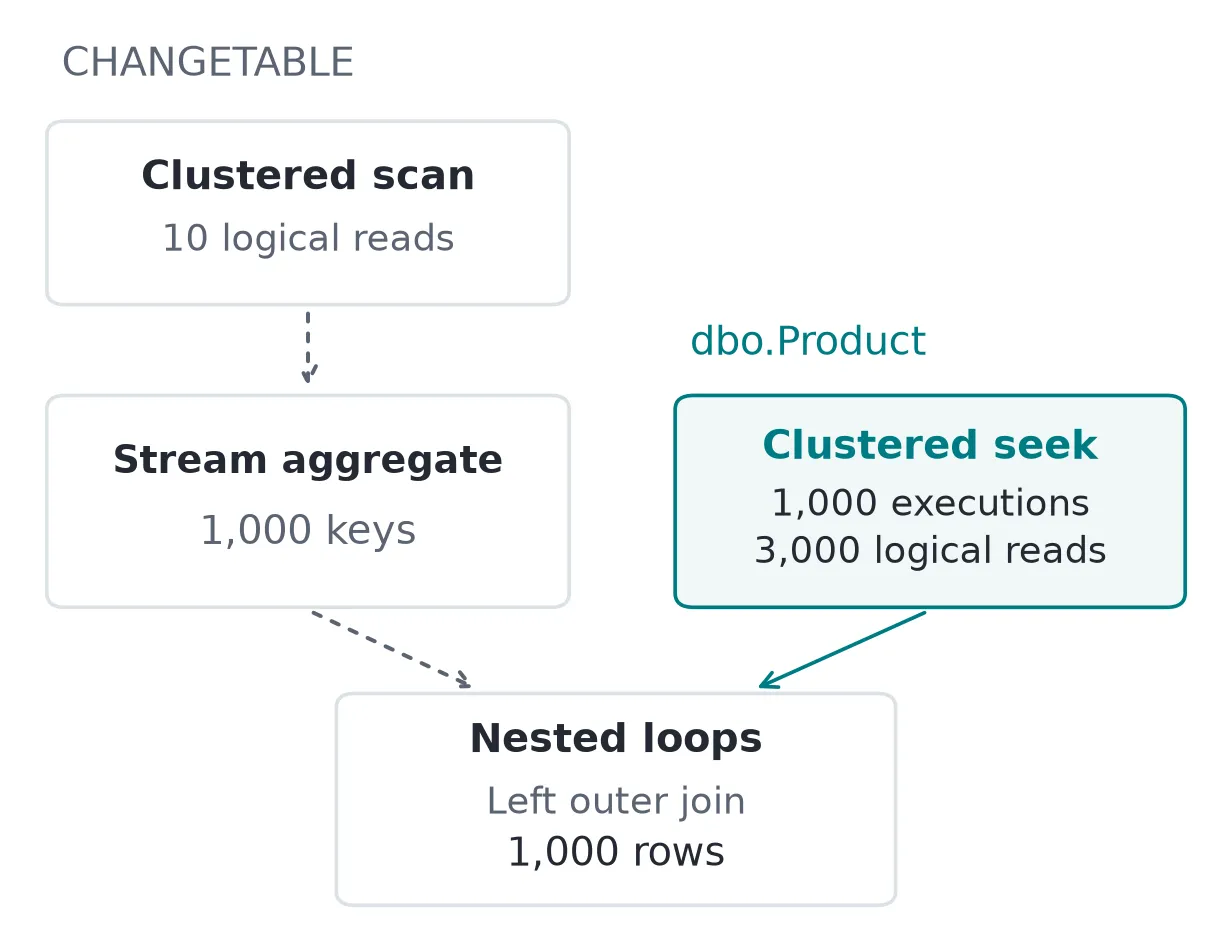
Each changed key led to a source-index seek. The tracking side used a scan, then a transaction-data join, sort, and aggregation. A small result doesn’t necessarily mean SQL Server only touched that many rows to produce it,1 so the plan is worth opening when a change query gets slow. CHANGETABLE has a FORCESEEK option for investigating a problematic scan.
Now say the worker has fallen behind. We’ll keep the source at 100,000 products and fetch the narrow response, but increase how many products have changed since its checkpoint:
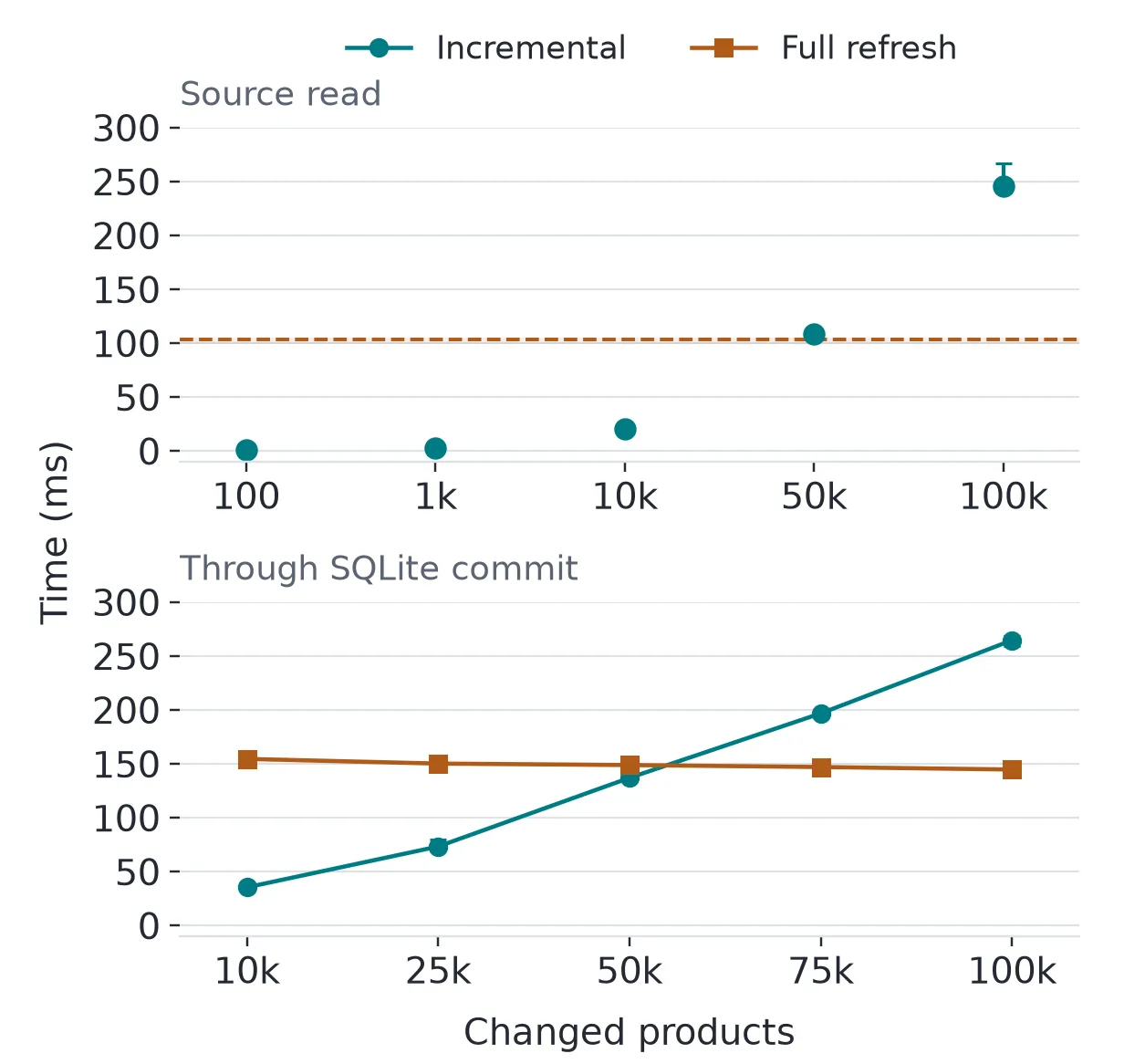
With 50,000 changed products, the incremental response took 108 ms. Reading all 100,000 products took 103 ms, so by then the incremental query had caught up with the cost of a full read. At 100,000 changes, the incremental response took 246 ms. Fetching full descriptions gave a similar result at 100,000 changes: 4.2 seconds for the incremental read and 3.9 seconds for a full refresh.
I then ran the narrow comparison through the destination commit. Each run started with the same 100,000-row SQLite copy. The incremental path upserted the changed products, while the full-refresh path deleted and replaced the copy. Both saved the checkpoint in the same synchronous=FULL transaction as the data.
At 50,000 changes, incremental synchronization took 137 ms, and the full refresh took 149 ms. At 75,000, those moved to 197 and 147 ms. For this implementation, the crossover through the destination commit sits somewhere between half and three-quarters of the catalog. Large descriptions, a remote destination, or a different apply strategy can put it somewhere else.
In an application, the writer keeps going while the worker fetches its backlog. An empty poll took around 0.4 ms on its own. To see what happens with readers and writers running together, I added one or four narrow readers, each polling every 50 or 500 ms.
Column tracking stayed on, and each write transaction changed 100 rows. Each case ran three times for ten seconds on the same workstation. The readers only fetched changes and did nothing else:
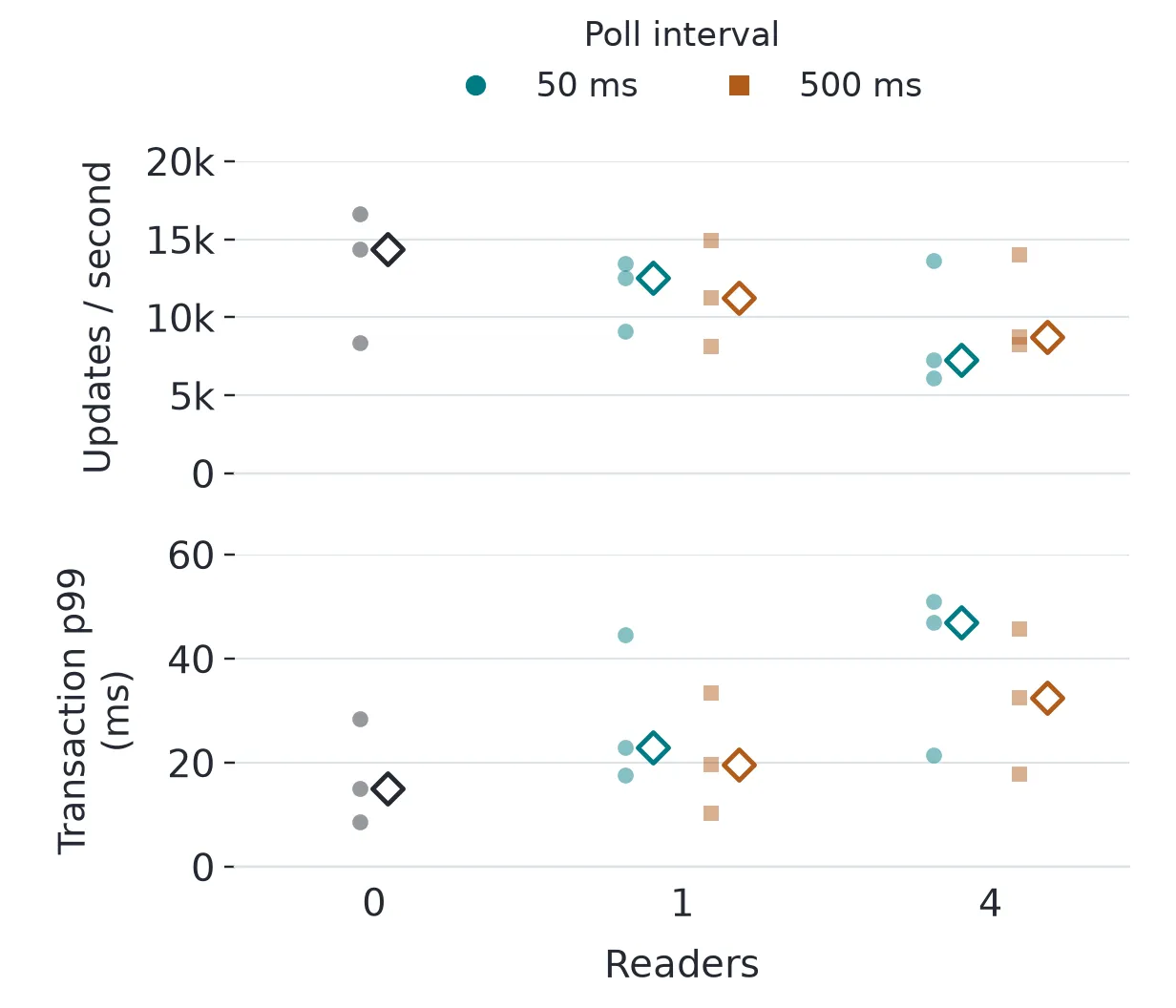
At 50 ms, adding four readers reduced median writer throughput from about 14,400 to 7,300 row updates per second. The median 99th-percentile transaction latency rose from 15 to 47 ms. The 500 ms cases were less clear: spacing out the polls didn’t consistently improve both throughput and latency, and the individual runs varied quite a bit.
I wouldn’t pick the interval from the 0.4 ms empty poll by itself. In the three four-reader runs at 50 ms, the readers completed between 717 and 796 polls and returned between 244,800 and 546,400 rows between them while the writer was trying to commit. I don’t have enough here to blame the scan or the joins specifically. Four copies of that query are still work for the primary, on a container with only four CPUs. What each poll costs depends on how much changed during or since the last one. The interval only decides how often you pay it.
Letting cleanup catch up
We’ve been recording changes with automatic cleanup turned off, so by now there’s a good bit of metadata piled up. I turned cleanup back on and gave it an hour of writes to deal with.
Retention sets the minimum time SQL Server keeps tracking information, but it still has to run cleanup to actually remove it. Setting retention to two minutes doesn’t mean cleanup runs every two minutes.
SQL Server changed its cleanup implementation in 2025. The 2022 worker uses what Microsoft calls deep cleanup and wakes every 30 minutes by default. In 2025, adaptive shallow cleanup is enabled by default for large side tables. I ran the same workload on both versions with their default cleanup behavior, so we can see what the two methods actually do differently.
Each instance had a million-product table with a two-minute retention period. The writer updated 1,000 rows per transaction, every second, for an hour. I sampled used and reserved pages every 30 seconds and recorded cleanup with Extended Events, then kept sampling for five minutes after the writer stopped.
A snapshot stayed open for the first 35 minutes too, in a separate database on each instance. Being in another database doesn’t get it out of the way of cleanup: SQL Server uses an instance-wide boundary when cleaning up transaction records.
While the snapshot was still open, the first 2022 cycle reduced the main change table’s estimated row count from roughly 1.6 million to 671,190. Its used space didn’t immediately fall with the row count, and the snapshot database’s minimum valid version hadn’t advanced. Here’s how the change table and transaction table grew and shrank over the run:
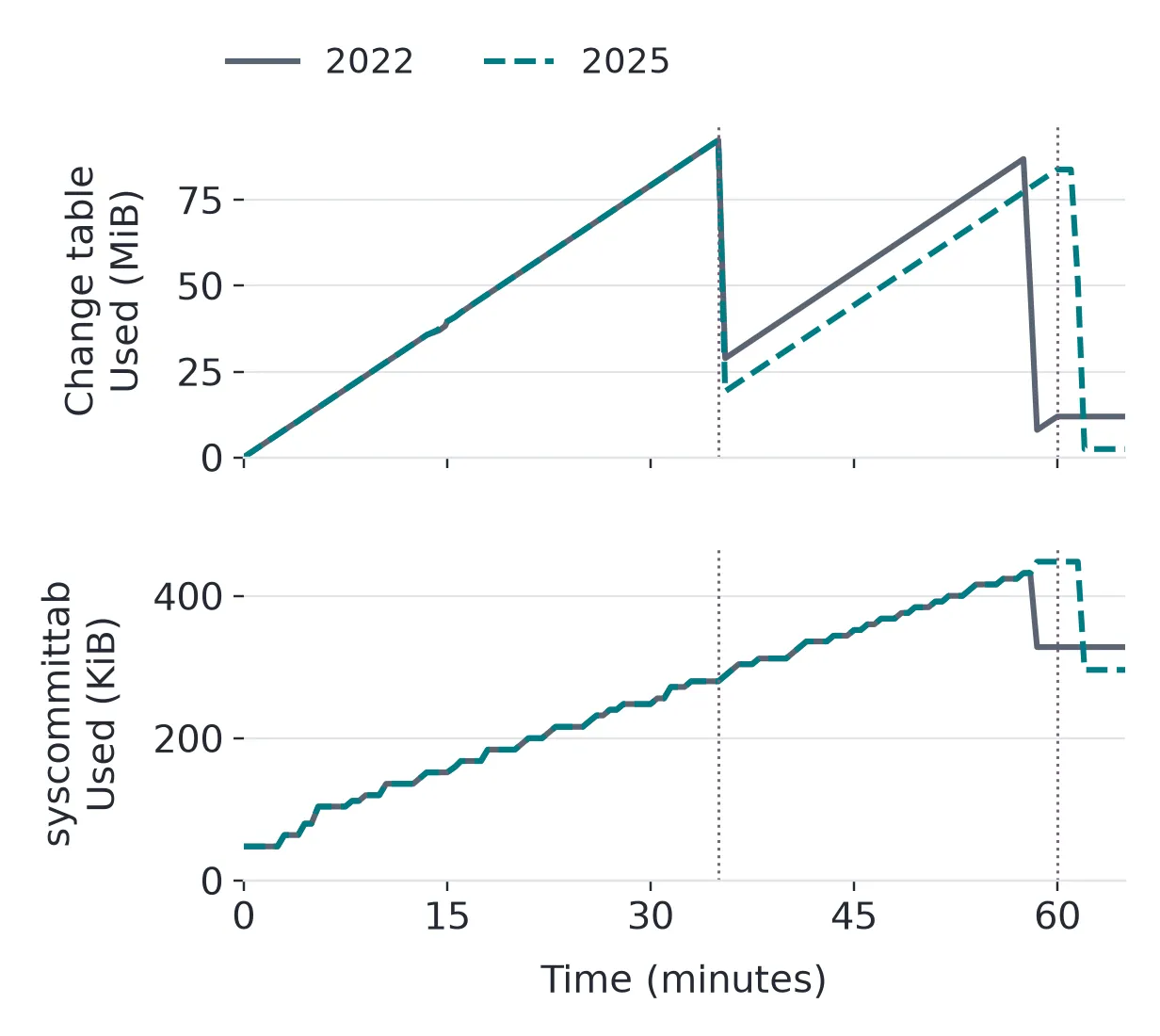
The 2025 trace recorded adaptive cleanup boundaries for the large side table. In the second cycle, 2022 removed about 1.86 million entries in 39 seconds; 2025 removed about 1.85 million in 34 seconds. That’s one cycle from each engine; I didn’t isolate cleanup CPU, and the workers started their cycles at different times.
There’s still metadata left when the traces end at 65 minutes. To see whether cleanup can sustain this write rate, we’d need to run more cycles and see whether the backlog settles.
For these samples, I found the internal tables through sys.internal_tables and counted their used and reserved pages with sys.dm_db_partition_stats. The chart tracks those allocations, rather than the actual physical file size. Microsoft’s cleanup troubleshooting guide goes into the side-table and syscommittab growth to look for when cleanup falls behind.
I also tried recovering from checkpoint zero, which had expired on both instances. With the writer still running, the recovery code read all one million ProductId and Price pairs in a snapshot, replaced the SQLite copy, and committed the new checkpoint. Every copied price was checked against the writer’s known sequence at the snapshot boundary.
The full recovery took about 1.6 seconds on both engines, with one recovery measured per engine and about 33.3 MiB of JSONL each. That includes the full durable destination commit, including streaming and serialization. We’re copying two columns locally here. Bringing along the large descriptions or writing across a network would change how much work recovery has to do.
Resets and restores
If we change a product’s primary key, the worker has to deal with the old key in its copy. In the checks, SQL Server returned a delete for that key and an insert for the new one. Adding a column, by contrast, produced no row-change notification. We have to account for that in our schema migrations, updating the local schema and refreshing the column IDs the worker uses.
The minimum-version check still handles retention expiry. For a deliberate reset, we can also give the worker an application-managed generation ID. Pause syncing, perform the reset, and change that ID before workers resume. A worker with the old ID then rebuilds its copy, even if its numeric checkpoint passes validation.
Restores are another trap. In the restore check, the local copy held a price of 77 while the restored source held 30. Later transactions advanced the database version far enough for the old checkpoint to pass, but asking for changes couldn’t recover the lost update. The restore procedure needs to change the generation ID or force a rebuild before syncing resumes. Restoring that ID from the same backup would leave us with the same problem.
Partition switching also won’t work with a tracked table on either side of the switch. SQL Server rejected the attempt in the test, as expected.
Which products should the worker see?
Our worker has had the whole catalog to itself. If it only serves one tenant, we have to think about what it can see, especially keys for products that tenant has no business knowing exist.
The reader needs SELECT on the primary key and VIEW CHANGE TRACKING on the table, plus permission to fetch the source values.
Deletions make filtering harder too. If the tenant ID was a non-key column, deleting the product removes the value we originally used to route its deletion. A product moving out of the tenant’s filter causes a similar problem: filtering by its current values stops returning it, while the old copy is still sitting in that tenant’s application. We need to retain just enough information to send the removal to the right worker, whether that’s in the key, application state, or a table prepared for syncing.
If you’re weighing CT against CDC, SQL Server 2025’s feature matrix lists CT in Enterprise, Standard, and Express, and CDC in Enterprise and Standard. Our worker only needs the current products, but keeping change history is a reason to look at CDC.
Where I landed
On the one-million-row write test, the median CPU for 10,000 price changes was 25 ms higher with tracking, along with about 1.6 MiB more log writes. Recording column information brought the CPU difference to 30 ms and the same 1.6 MiB after rounding. The wall-clock tests were too noisy to give that a useful latency percentage.
On the 100,000-row sync test, a 10% change set made it through the durable SQLite commit in 35 ms, compared with 155 ms for a full refresh. By 75%, the full refresh was faster. This is the trade we’re making. We do some extra work on every write, plus storage and cleanup, but in exchange we skip most of the catalog while the changed part stays small. Keep in mind, the reader count and polling interval still have to fit on the primary alongside the writers.
Footnotes
-
that affects you too, GraphQL enjoyers… ↩
Thanks for reading. I'll do my best to keep improving.